top of page

HON YI HANG
Title. Double click me.
Project 3: Animation Video
Work In Progress
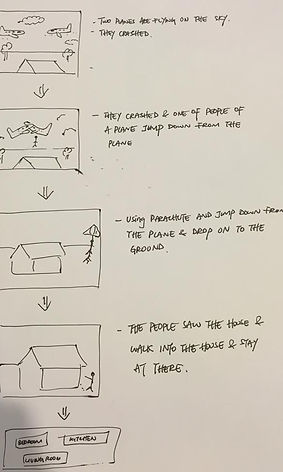
Step 1: Create and draw out the storyline
Story is about two planes are crashed in the sky. However, one of the pilot has jumped out from the plane before the plane is going to crash. When he fall down from the plane, he saw a house on the ground. After he landed on the groud, he walked into the house and stayed at there.

Step 2: Download the plane from Archive 3D

Step 3: Put and adjust the planes in 3d Max

Step 4: Check ' Use Environment Background' and make the background show on the viewport

Step 5: Start to create the length of frame and the speed of the animation

Step 6: Turn on the 'Auto Key' and record the animation

Step 7: Start to rendering

Step 8: Create a curved line for camera to run

Step 9: Go to 'Modify' and make the curved line to be smoother

Step 10: Set a camera to create animation

Step 11: Select ' Path Constraint' to let the camera places on the line that I created just now

Step 12: The camera is place on the line and it will run by following the line and now can start to record the animation as well

Step 13: Using window movie maker to edit, trim, export and compile all the animation
The Final Outcome of My Video
bottom of page